
User Interviews for MVPs: Script, Analysis, and When to Run Them (2026)
User interviews save months—or waste weeks. Learn when to run them, what to ask, common traps, and how to turn quotes into decisions. Get started today.
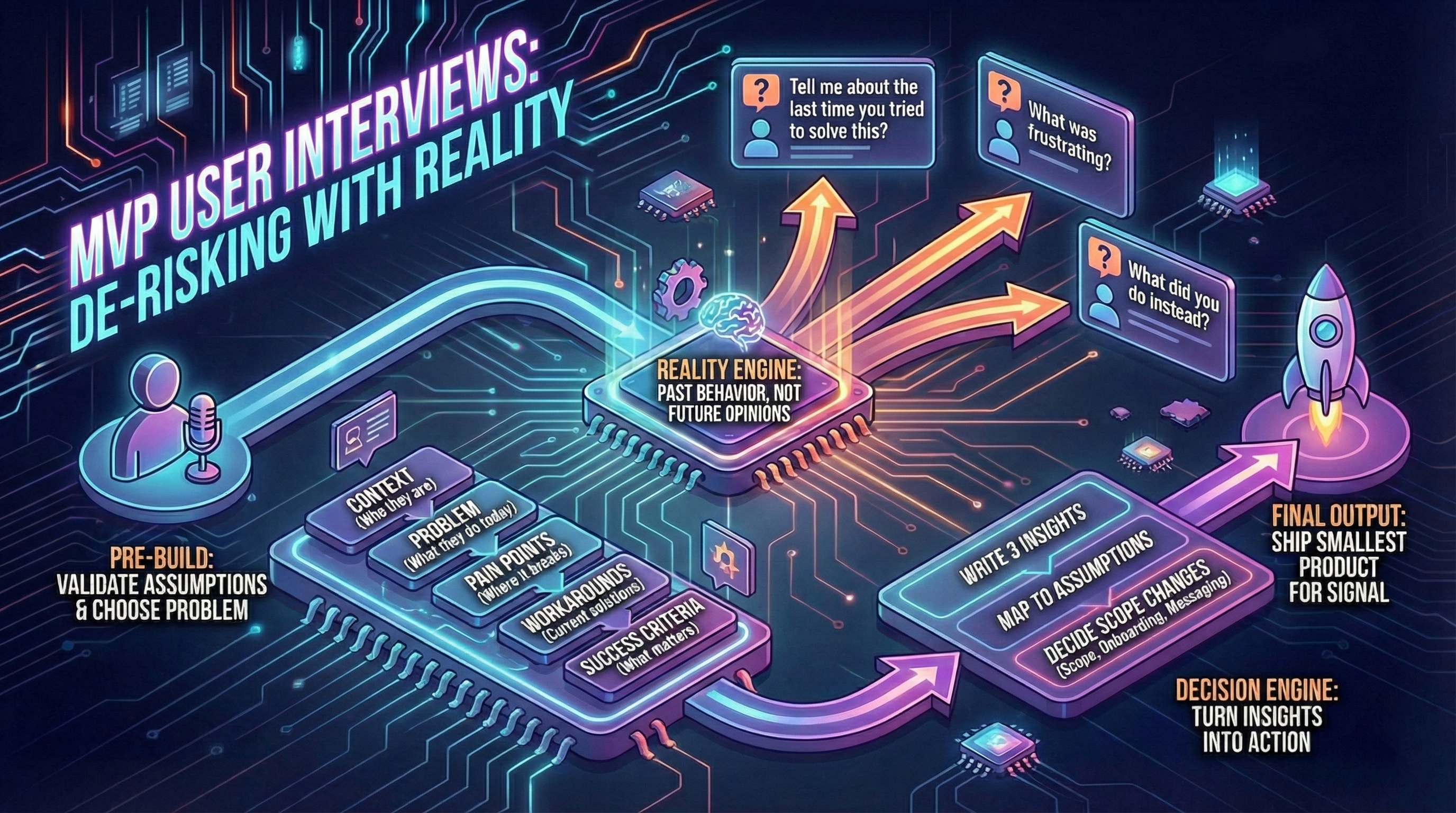
User interviews can make an MVP faster—or waste weeks. The difference is whether you’re collecting opinions or uncovering reality.
Need help conducting user interviews? Talk to our consultants for guidance on validation strategies.
This guide shows how to run MVP interviews that reduce risk and improve scoping (see how to scope) and post-launch iteration (see post-MVP decisions).
When to run interviews
Before building (discovery phase)
Use interviews to validate assumptions and choose the problem. This is where most MVP waste can be avoided.
Goal: Understand if problem is real, how users solve it today, and what “good enough” looks like.
Who to interview: 5-10 people from target user group (not friends, not co-founders).
Duration: 20-30 minutes.
During build (validation phase)
Use short sessions to test flow clarity and spot blockers early.
Goal: Validate that onboarding makes sense, core flow is comprehensible.
Who to interview: 3-5 people (can be same cohort as discovery, or new).
Duration: 15-20 minutes (show prototype or early MVP, observe).
After launch (iteration phase)
Use interviews to explain metrics: why users drop off, why some activate, why retention is weak (see metrics).
Goal: Understand behavior patterns (why churn, why activate, what’s confusing).
Who to interview:
- 3-5 churned users (signed up, didn’t activate)
- 3-5 activated users (completed core action)
- 2-3 power users (high engagement)
Duration: 15-25 minutes.
Ask about past behavior, not future opinions
Good questions:
- “Tell me about the last time you tried to solve this.”
- “What did you try first?”
- “What was frustrating?”
- “What did you do instead?”
Avoid:
- “Would you use this?” (people are polite, they’ll say yes)
- “Do you like this idea?” (opinions are cheap)
- “Would you pay?” without trade-offs (see pricing validation)
Why past behavior matters: What people did reveals constraints. What they say they’ll do reveals optimism.
Interview script templates by stage
Template 1: Pre-launch discovery (20-30 min)
Context (5 min):
- “Tell me about your role. What does a typical day look like?”
- “How do you currently handle [problem area]?”
Problem exploration (10 min):
- “Walk me through the last time you tried to [solve problem].”
- “What made that frustrating or difficult?”
- “What tools or workarounds do you use today?”
- “What would need to change for you to switch to something new?”
Success criteria (5 min):
- “If this problem disappeared tomorrow, what would that enable for you?”
- “How much time/money does this problem cost you per week?”
Close (5 min):
- “Is there anything I didn’t ask that I should have?”
- “Can I follow up with you in 4-6 weeks to show you what we built?”
Template 2: Post-activation interview (15-20 min)
Context (3 min):
- “When did you first try [product]?”
- “What prompted you to sign up?”
Activation experience (10 min):
- “Walk me through your first session. What did you try to do?”
- “Was there a moment where it clicked? Or where you got confused?”
- “Did you complete [core action]? If yes, was the outcome what you expected?”
- “What almost made you give up?”
Value assessment (5 min):
- “Do you plan to use this again? Why or why not?”
- “What would make this a must-have for you?”
Template 3: Churn exit interview (15-20 min)
Context (3 min):
- “When did you sign up for [product]?”
- “What were you hoping to achieve?”
Drop-off exploration (10 min):
- “What happened after you signed up? Walk me through your experience.”
- “At what point did you decide to stop using it?”
- “What was the main reason you stopped? (confusion, didn’t solve problem, too complex, etc.)”
- “What would have needed to be different for you to keep using it?”
Alternatives (5 min):
- “What are you using instead now?”
- “Is the original problem still unsolved, or did you find another way?”
Interview mistakes and how to fix them
Mistake 1: Leading questions
Bad: “Don’t you think it’s frustrating when X happens?”
Good: “Tell me about the last time X happened. How did that go?”
Why: Leading questions get confirmation bias, not reality.
Mistake 2: Asking “Would you pay for this?”
Bad: “Would you pay $10/month for this?”
Good: “How much time/money does this problem cost you per week?” then “If this saved you 5 hours/week, what would that be worth?”
Why: Direct willingness-to-pay questions get polite answers. Trade-off questions reveal real value.
See pricing validation for better pricing research tactics.
Mistake 3: Talking more than listening
Symptom: You spend 15 minutes explaining your vision, user says “Sounds great!”
Fix: 80/20 rule (user talks 80%, you talk 20%).
Tactic: After asking question, pause for 5 seconds. Let silence prompt deeper answers.
Mistake 4: Confirming what you already believe
Symptom: You only interview people who match your ideal user hypothesis.
Fix: Interview 2-3 people who DON’T fit your hypothesis (adjacent users, non-users).
Why: Disconfirming evidence is more valuable than confirming evidence.
Mistake 5: No follow-up questions
Bad: User says “It was confusing.” You move to next question.
Good: “What specifically was confusing? Can you show me where you got stuck?”
Why: Surface-level answers hide actionable insights.
A simple interview structure

Below the diagram, keep notes focused on:
- Pains (frequency, severity)
- Existing alternatives (what they use now)
- Willingness to change behavior (what triggers switching)
How many interviews are enough?
- 5 interviews to spot themes (patterns start emerging)
- 10 to confirm patterns (saturation for MVP stage)
- More only if signals conflict (e.g., B2B vs B2C users say opposite things)
Diminishing returns: After 10 interviews, you’re hearing repetition. Move to building.
Exception: If building marketplace (two-sided), interview 5 supply-side + 5 demand-side (10 total).
See how we approached this in practice: Creative Two-Sided Marketplace Platform—where identifying the credibility bottleneck became the key scoping decision.
Synthesis framework: turn interviews into insights
Step 1: Tag quotes (during or immediately after interview)
Label quotes with tags:
- Pain (user describes friction)
- Workaround (how they solve it today)
- Feature request (what they wish existed)
- Confusion (where they got stuck)
- Value (what outcome they care about)
Tool: Notion, Dovetail, or Google Doc with highlights.
Step 2: Cluster patterns (after 5-10 interviews)
Group quotes by theme:
Example (post-launch churn interviews):
Theme 1: Onboarding confusion (7 of 10 users)
- “I didn’t know where to start” (User 2, 5, 7, 9)
- “Too many options on first screen” (User 3, 6, 10)
Theme 2: Value unclear (5 of 10 users)
- “I couldn’t tell if it worked” (User 1, 4, 8)
- “Didn’t see the result I expected” (User 5, 9)
Theme 3: Too slow (3 of 10 users)
- “Page took forever to load” (User 2, 6, 8)
Step 3: Map to decisions (prioritize by frequency + severity)
Decision 1 (7 users hit onboarding confusion → high impact):
- Action: Simplify first screen (reduce options from 5 to 2)
- Timeline: Next sprint (Week 1)
Decision 2 (5 users unclear on value → medium-high impact):
- Action: Add “You did it!” confirmation screen with result preview
- Timeline: Week 2
Decision 3 (3 users hit slow performance → medium impact):
- Action: Optimize slow query (technical fix)
- Timeline: Week 3
Rule: If 50%+ of interviewees mention same issue, prioritize it.
Remote interview tools
Video recording:
- Zoom (local recording, free tier)
- Google Meet (free, no recording on free tier)
- Loom (async, good for “show me your workflow” prompts)
Transcription:
- Otter.ai (free tier 300 min/month, real-time transcription)
- Zoom auto-transcription (paid tier)
- Manual (faster to tag quotes directly during interview)
Analysis:
- Dovetail (purpose-built for user research, €25/user/month)
- Notion (cheap, flexible, tagging via highlights)
- Google Docs (free, simple tagging with comments)
Scheduling:
- Calendly (free tier, easy booking)
- Email (simple, personal, works for small cohorts)
Turning interviews into decisions
After each interview:
- Write 3 insights (not 10, just the top 3 quotes/patterns)
- Map to assumptions (does this validate or invalidate our hypothesis?)
- Decide what changes in scope, onboarding, or messaging
Example (post-launch interviews reveal onboarding confusion):
- Insight: 7 of 10 users didn’t understand first screen
- Assumption: “Onboarding is intuitive” (invalidated)
- Decision: Rebuild onboarding with single CTA, delay advanced options to second screen
If interviews don’t change your decisions, they are theater.
Sample size guidance by stage
| Stage | Sample Size | Goal |
|---|---|---|
| Pre-launch discovery | 5-10 | Validate problem, understand current solutions |
| Mid-build validation | 3-5 | Test flow comprehension, spot blockers |
| Post-launch iteration | 10-15 total | Understand drop-off (5 churned), activation (5 activated), retention (3-5 power users) |
Total time investment: 10 interviews × 25 min each = 4 hours (very high ROI).
Conclusion
Interviews aren’t about collecting support. They’re about understanding reality so you can scope and ship the smallest product that produces a signal.
Remember:
- Timing: Pre-launch (5-10), mid-build (3-5), post-launch (10-15)
- Questions: Past behavior (“last time you…”) > future opinions (“would you…”)
- Mistakes: Leading questions, no follow-ups, confirmation bias, talking too much
- Synthesis: Tag quotes → cluster themes → map to decisions (50%+ frequency = prioritize)
- Sample size: 5 = themes emerge, 10 = patterns confirmed
Next step: Scope your MVP—use interview insights to prioritize features.