
MVP Tech Stack 2026: By Type (B2B SaaS, AI, Mobile, Marketplace)
Best MVP stack ships fast, measures well, and doesn't trap you in a rebuild. Get concrete recommendations by product type with cost comparison. Contact us to learn more.
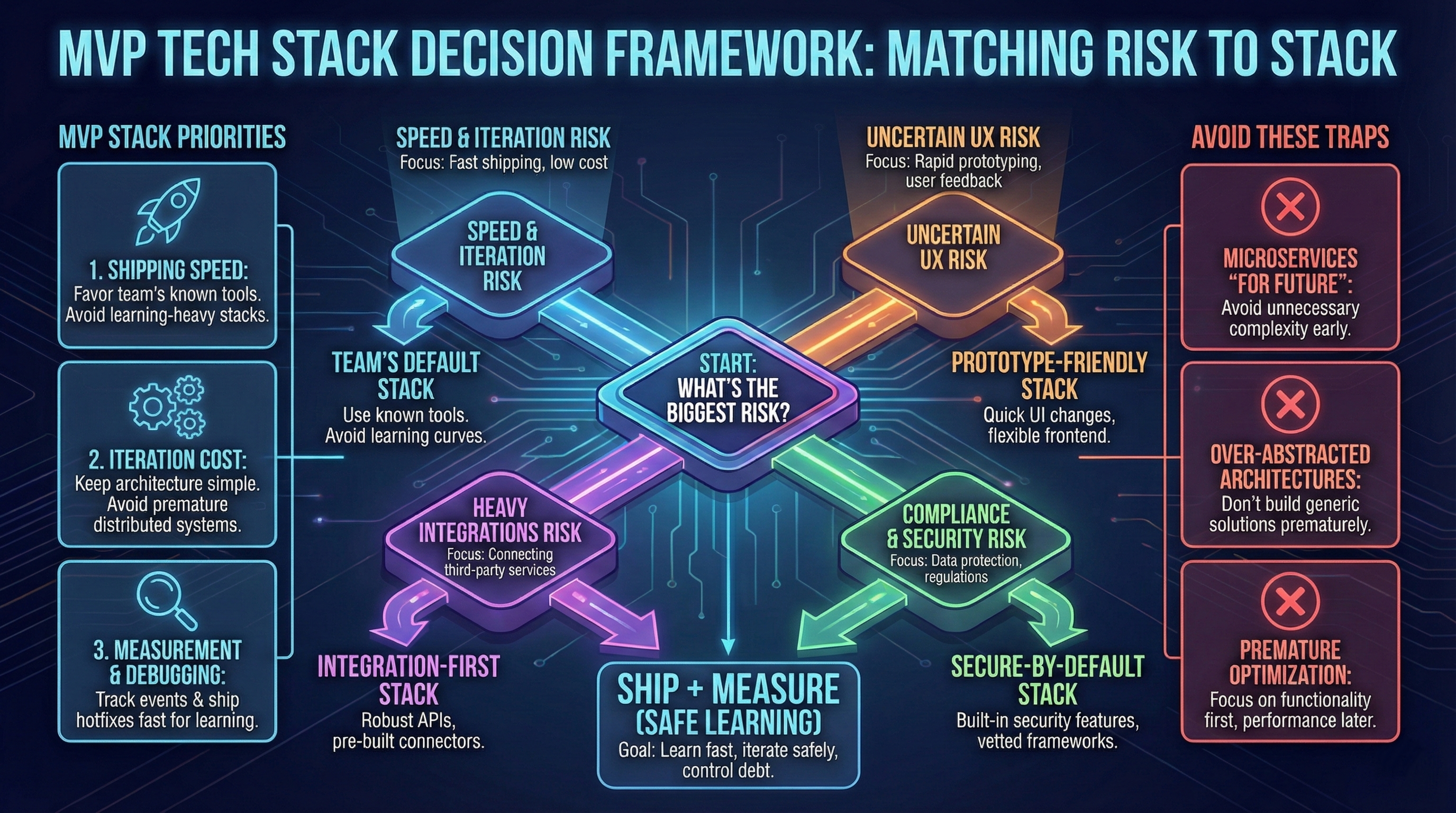
Founders often ask, “What’s the best tech stack for an MVP?” The best answer is: the one that ships and learns fastest, safely.
We’ve learned through dozens of projects that a stack is not a badge. It’s a risk decision. Your MVP stack should support:
- Speed to first release (see roadmap)
- Low iteration cost
- Observability (see metrics)
- Controlled technical debt
This article gives you concrete stack examples (including 2026 AI-native stacks), decision matrix, migration paths, and cost breakdowns.
Need help choosing your MVP tech stack? Talk to our consultants for guidance.
Match the stack to the dominant risk

Stack archetypes with concrete examples
1. AI-native stack (2026 new category)
Best for: Technical founders who want to leverage AI tools for 10x speed.
Example stack: Cursor + v0.dev + Next.js + Supabase + Vercel
How it works:
- Cursor: AI-powered code editor (replaces VS Code with AI autocomplete on steroids)
- v0.dev: Generate React components from text prompts (Vercel’s AI UI tool)
- Next.js: Full-stack framework (frontend + API routes)
- Supabase: Postgres database + auth + storage (open-source Firebase alternative)
- Vercel: Deploy with Git push (zero config)
Workflow example:
- Prompt v0.dev: “Create signup form with email validation”
- Copy generated component into Next.js project
- Use Cursor to adapt component to your Supabase schema (AI suggests exact API calls)
- Push to Git → Vercel auto-deploys
Time to MVP: 3-5 weeks (vs 6-8 weeks traditional Next.js)
When to choose: Technical founder comfortable reviewing AI-generated code, web-first SaaS, rapid prototyping needed.
Trade-offs:
- AI generates boilerplate fast, but complex logic still requires manual coding
- Need to review AI code for bugs (trust but verify)
- Works best for standard patterns (CRUD, forms, dashboards)
Cost (Year 1): €1.200-€2.000 (Cursor Pro €240/year, v0.dev €0-€300, Supabase €300-€600, Vercel €0-€600)
2. Full-stack framework (Best for web-first SaaS)
Example stack: Next.js + Vercel + Supabase (or Postgres)
Why it works:
- Single codebase for frontend + backend (API routes)
- Deploy in minutes (Vercel Git integration)
- Built-in auth, database, and storage (Supabase)
- TypeScript end-to-end (type safety without overhead)
Time to MVP: 4-6 weeks
When to choose: Web-first product, standard CRUD operations, team knows React/TypeScript.
Trade-offs: Less flexibility for complex backend logic, vendor lock-in risk (mitigated by open-source Supabase).
Cost (Year 1): €600-€1.500 (Vercel €0-€600, Supabase €300-€600, monitoring €300)
3. Backend-first (Best for complex logic/integrations)
Example stack: Node.js (Express/Fastify) or Python (FastAPI) + PostgreSQL + React
Why it works:
- Full control over backend architecture
- Easy to integrate with external APIs (Stripe, Twilio, etc.)
- Mature ecosystems (npm, PyPI)
- Clear separation of concerns (API contracts)
Time to MVP: 6-8 weeks
When to choose: Heavy data processing, complex business logic, multiple integrations, team has backend expertise.
Trade-offs: More setup overhead, requires separate deployment for frontend + backend.
Cost (Year 1): €1.200-€2.500 (Hosting €600-€1.200, database €300-€600, CDN €0-€300, monitoring €300-€400)
4. No-code hybrid (Best for validation-first MVPs)
Example stack: Webflow/Framer + Airtable + Make/Zapier
Why it works:
- Zero coding for frontend (visual builders)
- Airtable as database + admin panel
- Make/Zapier for workflows and integrations
- Can launch in days, not weeks
Time to MVP: 2-4 weeks
When to choose: Non-technical founder, validation before building, simple CRUD, content-heavy product.
Trade-offs: High iteration cost after ~10k users, tech debt accumulates fast, limited customization, expensive at scale.
Cost (Year 1): €1.800-€4.000 (Webflow €500-€800, Airtable €600-€1.200, Make/Zapier €600-€1.500, other tools €100-€500)
5. Mobile-first (Best for mobile-native experiences)
Example stack: React Native + Firebase (or Supabase)
Why it works:
- Single codebase for iOS + Android
- Firebase handles auth, database, push notifications
- Expo for faster development (no native code initially)
- Hot reload for fast iteration
Time to MVP: 6-10 weeks
When to choose: Mobile-first product (camera, GPS, notifications critical), consumer app, team knows React.
Trade-offs: Performance limitations vs native, Firebase costs scale with usage, harder to debug than web.
Cost (Year 1): €1.500-€3.000 (Firebase €600-€1.500, App Store + Play Store €120, push notifications €300-€600, monitoring €300-€400)
Cost breakdown comparison (Year 1)
| Stack Type | Hosting | Database | Tools | Monitoring | Total Year 1 |
|---|---|---|---|---|---|
| AI-native (Cursor + v0 + Next.js + Supabase) | €0-€600 | €300-€600 | €240-€600 (Cursor + v0) | €300 | €1.200-€2.000 |
| Full-stack (Next.js + Supabase) | €0-€600 | €300-€600 | €0 | €300 | €600-€1.500 |
| Backend-first (Node.js/Python + Postgres) | €600-€1.200 | €300-€600 | €0-€300 | €300-€400 | €1.200-€2.500 |
| No-code hybrid (Webflow + Airtable) | €500-€800 | €600-€1.200 | €600-€1.500 | €100-€500 | €1.800-€4.000 |
| Mobile-first (React Native + Firebase) | €0-€300 | €600-€1.500 | €120 (stores) + €300-€600 | €300-€400 | €1.500-€3.000 |
Insight: No-code appears fast upfront (2-4 weeks) but costs 2-3x more per year (€1.8k-€4k) vs full-stack framework (€600-€1.5k). AI-native adds €240-€600/year for Cursor + v0 but saves 2-3 weeks development time.
Decision matrix: which stack to choose?
| Stack Type | Speed to Ship | Iteration Cost | Scaling Ceiling | Cost (Year 1) | When to Choose |
|---|---|---|---|---|---|
| AI-native | Very Fast (3-5w) | Low | High | €1.2k-€2k | Technical founder, web SaaS, rapid prototyping |
| Full-stack framework | Fast (4-6w) | Low | High | €600-€1.5k | Web-first SaaS, standard features |
| Backend-first | Medium (6-8w) | Medium | Very High | €1.2k-€2.5k | Complex logic, heavy integrations |
| No-code hybrid | Very Fast (2-4w) | High (refactor at scale) | Low-Medium | €1.8k-€4k | Validation first, rebuild expected |
| Mobile-first | Medium (6-10w) | Medium | High | €1.5k-€3k | Mobile-native features required |
Migration paths: when to upgrade from no-code
Scenario: Bubble MVP → Next.js + Supabase
Trigger: Hit 50k rows, performance degraded, need custom API integrations.
Migration steps (8-12 weeks):
Week 1-2: Audit & Schema Design
- Export Bubble data: Download as CSV (all tables)
- Schema mapping: Map Bubble tables to Postgres schema
- Identify dependencies: Which workflows depend on Bubble plugins? (prioritize rewrites)
Output: Database schema SQL + migration plan document.
Week 3-4: Setup New Infrastructure
- Create Supabase project: Import schema, enable Row-Level Security (RLS)
- Setup Next.js repo: Initialize with TypeScript + Tailwind
- Migrate data: Use Supabase import tool (CSV → Postgres)
- Test data integrity: Run queries to verify row counts match
Output: Data migrated, new stack deployed to staging environment.
Week 5-8: Rebuild Core Features
Priority order:
- Auth (login, signup, password reset)
- Core user flow (main feature that drives value)
- Admin panel (internal tools)
- Secondary features (nice-to-haves)
Reuse what works: Don’t rebuild UI from scratch. Use v0.dev or Shadcn UI components.
Output: Core flows functional in new stack, ready for beta testing.
Week 9-10: Parallel Run & Testing
- Run both systems: Bubble (production) + Next.js (beta)
- Invite 10-20 beta users: Test new stack with real usage
- Fix bugs: Prioritize critical flows (auth, payments, data integrity)
- Monitor performance: Compare load times (Bubble vs Next.js)
Output: Confidence in new stack, critical bugs fixed.
Week 11-12: Cutover & Deprecate Bubble
- Announce migration: Email all users 1 week in advance
- Cutover: Switch DNS/domain to Next.js app
- Monitor closely: 24/7 monitoring for first 48 hours
- Keep Bubble read-only: Don’t delete immediately (safety net for 30 days)
Output: Fully migrated to Next.js + Supabase. Bubble deprecated.
Migration cost breakdown
| Phase | DIY Time | Outsourced Cost | Risk |
|---|---|---|---|
| Audit & schema | 20-30h | €1.5k-€2k | Low |
| Infrastructure setup | 10-15h | €800-€1.2k | Medium |
| Rebuild core features | 80-120h | €6k-€10k | High (feature parity) |
| Testing & parallel run | 20-30h | €1.5k-€2k | Medium |
| Cutover | 10h | €800 | High (downtime risk) |
| TOTAL | 140-205h | €10.6k-€16k |
Insight: Migration costs €10k-€16k + 12 weeks. If you can start with custom stack (€8k-€15k + 6-8 weeks), you save €2k-€8k and avoid migration risk.
The “familiar stack” rule
Cost of learning: +2-4 weeks per unknown framework.
If your team knows Django but not Next.js, use Django. The “best” stack doesn’t matter if you can’t ship.
Team composition impact:
- Solo founder (technical): Use what you know best
- Solo founder (non-technical): No-code or hire for specific stack
- Technical co-founders: Use shared stack or split frontend/backend cleanly
- Outsourced team: Align with their expertise (switching costs too high at MVP stage)
When to break the rule:
- Legacy tech (PHP 5.x, unsupported frameworks)
- Tech stack fundamentally incompatible with product (desktop-only stack for mobile app)
- Security/compliance requirements (healthcare, fintech)
Otherwise: familiar > fashionable.
MVP stack priorities that matter
Shipping speed
Favor what your team already knows. MVPs punish learning-heavy stacks.
Red flag: “Let’s learn Rust while building the MVP.” Learn on side projects, not on critical path.
Iteration cost
Keep architecture simple. Avoid premature distributed systems.
Simple = good:
- Monolith > microservices (at MVP stage)
- Single database > multiple databases
- Server-side rendering > complex client-side state management
Why: Every abstraction layer = more places bugs hide.
Measurement and debugging
If you can’t track events and ship hotfixes fast, you’ll lose your best learning window (see launch checklist).
Must-haves:
- Event tracking (user actions)
- Error monitoring (crash reports)
- Logging (debug without reproducing)
Technical debt safety
Debt is fine; unbounded debt is not. Avoid irreversible choices early.
Acceptable debt:
- Manual admin operations (automate later)
- Simplified data models (refactor when patterns clear)
- Basic error handling (improve after validation)
Dangerous debt:
- No database migrations strategy
- Hardcoded configuration (passwords, API keys in code)
- No separation between environments (dev/staging/prod)
Observability essentials for MVPs
You need three types of observability:
1. Analytics (user behavior)
Tools:
- Plausible or PostHog: Privacy-first, EU-compliant, simple setup (€100-€300/year)
- Mixpanel: More powerful, event-based tracking (€0-€300/year free tier)
What to track:
- Page views (which pages get traffic)
- Core actions (signup, activation event, key feature usage)
- Funnel drop-offs (where users abandon)
Avoid: Tracking everything. Start with 5-10 events max.
2. Error tracking (what breaks)
Tools:
- Sentry: Free tier covers 5k events/month (€0-€300/year)
- Rollbar: Alternative with similar features
What to capture:
- Uncaught exceptions
- API errors (4xx, 5xx responses)
- User context (which user hit the bug)
Avoid: Silencing errors. Every error = potential churn.
3. Logging (debugging context)
Tools:
- Structured logs: JSON format, easy to search
- CloudWatch (AWS), Logflare (Cloudflare), or Logtail
What to log:
- Request/response cycles
- State changes (user upgraded, payment processed)
- Performance bottlenecks (slow queries)
Avoid: Logging sensitive data (passwords, tokens, PII).
What to avoid at MVP stage
Microservices “for the future”
You don’t have scale problems yet. Start with monolith, split later when you know boundaries.
Why it’s tempting: Sounds sophisticated, resume-building.
Why it fails: 10x complexity, harder to debug, premature optimization.
Over-abstracted architectures
Clean Architecture, Hexagonal Architecture, Domain-Driven Design are great—after you know the domain.
At MVP stage: simple MVC or feature-based folders.
Premature performance optimization
“Will this scale to 1M users?” is the wrong question if you have 0 users.
Right question: “Can this handle 1,000 users without me waking up at 3am?”
Optimize after you have real usage patterns.
Exotic tech choices
Bleeding-edge frameworks, new languages, beta services—all add risk.
Exception: If the exotic tech solves a core problem (e.g., Elixir for real-time messaging), it’s not exotic—it’s essential.
Stack evolution: when to upgrade
Your MVP stack is not forever. Plan to upgrade when:
- Performance bottlenecks: Response times >3 seconds, database timeouts
- Scaling limits: No-code tools hit row limits, serverless functions timeout
- Team growth: Hiring requires mainstream stack (niche tech = hard to hire)
- Feature complexity: Current stack can’t support critical feature
Don’t upgrade because:
- Another founder said so
- Hacker News says X is dead
- You’re bored (refactor for learning on side projects)
Conclusion
Choose a stack that ships and measures quickly, then upgrade only when the signal earns it.
Remember:
- 2026 AI-native stack: Cursor + v0.dev + Next.js + Supabase = 3-5 weeks to MVP, €1.2k-€2k/year
- Cost comparison: Full-stack €600-€1.5k/year (cheapest), no-code €1.8k-€4k/year (most expensive)
- Migration path: Bubble → Next.js = 12 weeks + €10k-€16k (audit, rebuild, cutover)
- Familiar > fashionable (+2-4 weeks per unknown framework)
- Observability non-negotiable: Analytics + errors + logs (€200-€600/year total)
Next: MVP project management—how to keep delivery on track.
Sources
- Martin Fowler: Observability - Patterns for observable, maintainable systems
- IEEE Software: MVP Development Practices - Academic research on agile MVP methodologies