
MVP Launch Checklist: Pre-Launch to First 48 Hours (2026 Guide)
Most MVPs fail not from bad ideas but skipped basics. Get the full checklist from pre-launch alpha testing to the first 48 hours of monitoring. Read the full guide.
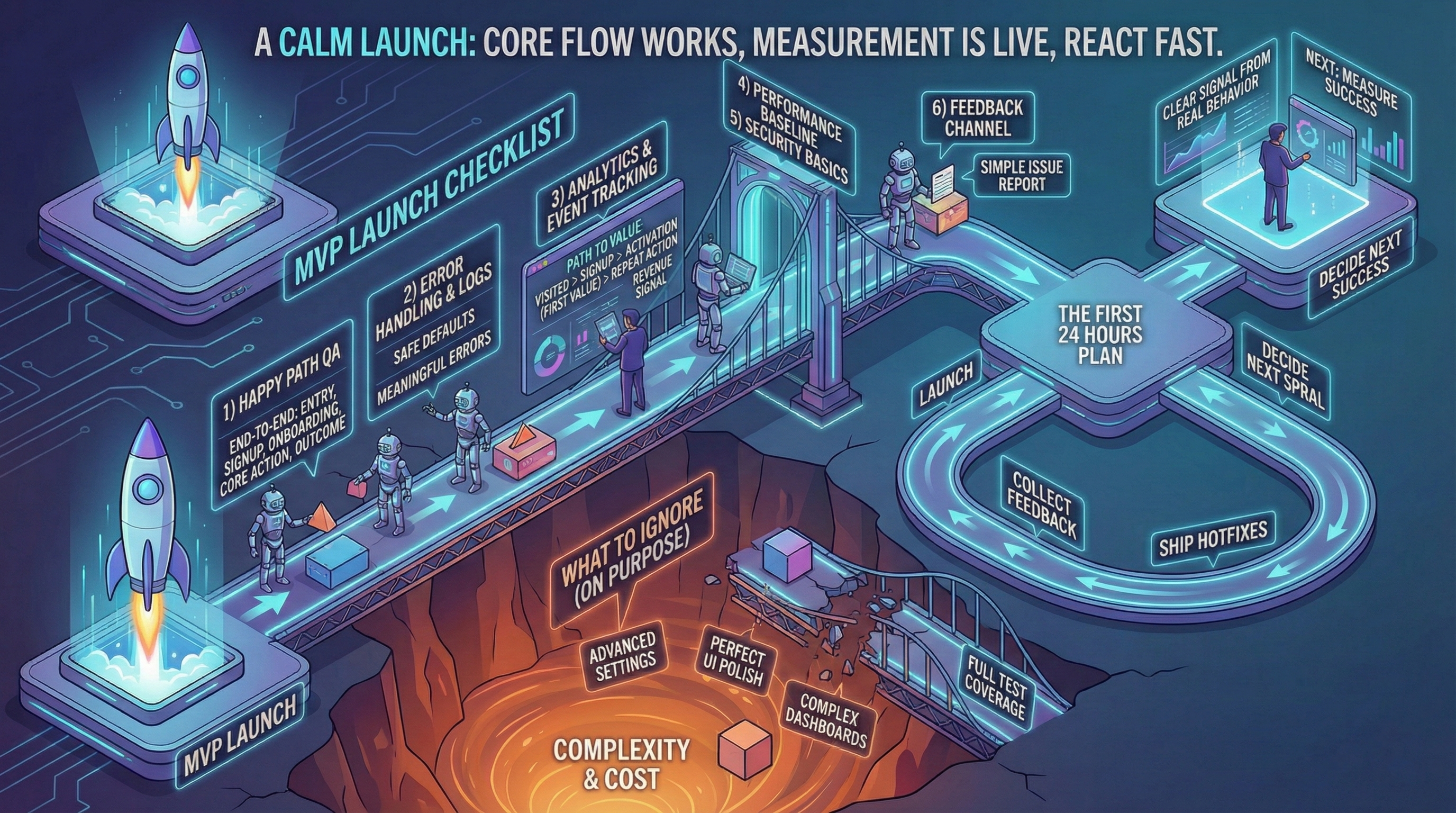
Most MVP launches don’t fail because the idea is wrong. They fail because teams skip boring basics: QA on the happy path, minimal analytics, and a simple recovery plan.
We’ve seen launches go sideways in the first 48 hours more times than we’d like to admit—and every time, it was something on this checklist that got missed.
If you need help preparing for launch, our development team can run through the checklist with you.
If you haven’t planned your build, start with the MVP roadmap. If you haven’t defined success, start with metrics.
The MVP launch goal
Your goal is not to impress. It’s to capture a clear signal from real behavior.
That requires:
- The core flow works
- You can see what users do
- You can react quickly
For pre-launch GTM preparation, see our guide on getting your first 100 users.
Pre-launch validation checklist (Week -1)
Don’t launch to 100 people with critical bugs. Launch to 5 alpha users first.
Alpha user test (48 hours before soft launch)
Who: 5 users from target audience (not co-founders, not family).
What to observe:
- Do they complete signup without help? (Time: <2 minutes = good)
- Do they reach first value? (Time: <10 minutes = good for MVP)
- What breaks? (Note exact steps, browser, device)
- Where do they hesitate? (Confusion = friction point)
Red flags that block launch:
- 0 of 5 complete core action (broken flow, delay launch)
- Critical data loss (user work disappears)
- Security issue (passwords visible, no auth)
Yellow flags (fix but don’t block):
- 2-3 of 5 complete (onboarding friction, iterate quickly)
- Slow performance (>5s page load)
- Minor UI bugs (misaligned buttons, typos)
Green light criteria: 3+ of 5 alpha users complete core action + no critical bugs.
Before launch, ensure you’ve hardened your prototype with our hardening checklist.
Technical readiness checklist
Analytics setup:
- Event tracking installed (Plausible, PostHog, or Mixpanel)
- Core events defined (signup, activation, retention proxy)
- Test: fire event, verify in dashboard (don’t trust blind deploy)
For detailed metrics setup, see how to measure MVP success.
Error monitoring:
- Sentry (or Rollbar) configured
- Test: trigger error, verify Sentry captures it
- Alerts: email/Slack on critical errors (payment failures, auth errors)
Logging:
- Structured logs (JSON format preferred)
- Log critical paths (signup flow, payment flow, core action)
- Avoid: logging sensitive data (passwords, credit cards, PII)
Performance baseline:
- Lighthouse Mobile score >70 (not perfect, but not frustrating)
- Core flow completes in <3 seconds (signup → activation)
- Database queries <500ms (check slow query logs)
Security basics:
- HTTPS enabled (not HTTP)
- Authentication works (can’t access others’ data)
- Input validation (no SQL injection, XSS basics)
- Rate limiting (signup, API endpoints)
- Environment variables (no hardcoded API keys/passwords in code)
Feedback channel:
- Intercom, Crisp, or simple email (support@yourdomain.com)
- Response time target: <24h (MVP stage, founders respond directly)
For ongoing transparency with users post-launch, see operational transparency practices.
Minimal but serious checklist
1. Happy path QA
Test end-to-end:
- Entry / signup: Can user create account? (Email, Google OAuth, etc.)
- Onboarding: Does first-time experience work? (Skip if concierge MVP)
- Core action: Can they do the main thing? (Create, search, book, purchase)
- Outcome delivered: Do they get value? (Result shown, email sent, data saved)
Test in:
- Chrome (most users)
- Safari Mobile (iOS)
- One other browser (Firefox or Edge)
Don’t test (at MVP stage): IE11, exotic browsers, every device combo.
2. Error handling that protects learning
You need:
- Safe defaults: If API fails, show cached data (not blank screen)
- Meaningful errors: “Payment failed: card declined” (not “Error 500”)
- Logs you can debug: Timestamp, user ID, action attempted, error stack
Example good error handling:
User tries to signup → Email already exists
→ Show: "This email is already registered. Log in instead?"
→ Log: {timestamp, email (hashed), signup_attempt, error: "duplicate_email"}
For debugging complex cascading bugs, see why every fix breaks something else.
3. Analytics and event tracking
Track the path to value:
- Visited (landing page view)
- Signup (account created)
- Activation (first core action completed)
- Repeat action (came back, did it again)
- Revenue signal (pricing page view, demo request, trial start)
See metrics guide for detailed setup.
Tools:
- Plausible (privacy-first, simple)
- PostHog (open-source, event-based)
- Mixpanel (powerful, free tier 20M events/month)
4. Performance baseline
Not perfect—just not frustrating.
Targets:
- Lighthouse Mobile: >70
- Time to Interactive: <3s
- Largest Contentful Paint: <2.5s
If you miss targets: Don’t block launch. Note slow pages, optimize post-launch.
5. Security basics
- Auth: Users can’t see each other’s data
- Input validation: Forms reject malicious input (SQL injection, XSS)
- Rate limiting: Signup endpoint limited to 5 attempts/minute per IP
- HTTPS: All traffic encrypted (free via Cloudflare, Vercel, Netlify)
Don’t over-engineer: Penetration testing, SOC2 compliance can wait (unless fintech/healthcare).
6. Feedback channel
Give users one simple way to report issues.
Options:
- Intercom widget (bottom-right chat)
- Simple mailto link (“Report bug: support@yourdomain.com”)
- Typeform embedded in app (“Having trouble? Tell us”)
Response SLA (MVP stage): <24 hours, founder responds personally.
Launch sequence: soft → iterate → public
Don’t launch to everyone Day 1. Sequence it:
Phase 1: Soft launch (Days 1-3)
Audience: 10-20 users (warm contacts, early waitlist, niche community).
Goal: Find breaking bugs, validate core flow works.
Activities:
- Monitor dashboard every 4 hours
- Fix critical bugs within 24h
- Interview 3-5 users (“What almost stopped you?”)
Green light to Phase 2: 50%+ complete core action, no critical bugs for 48h.
Phase 2: Feedback sprint (Days 4-7)
Audience: 50-100 users (broader outreach, LinkedIn, relevant communities).
Goal: Validate onboarding works at small scale, collect patterns.
Activities:
- Ship 2-3 hotfixes (biggest friction points from Phase 1)
- Weekly cohort analysis (Day 1 vs Day 7 retention)
- Refine messaging (if activation <40%, positioning unclear)
Green light to Phase 3: 40%+ activation, 30%+ Day 7 retention.
Phase 3: Public launch (Day 8+)
Audience: Broad (Product Hunt, social media, press if applicable).
Goal: Scale learning, test acquisition channels.
Activities:
- Scale support (shift from founder 1:1 to community forum or ticketing)
- Track cohorts by source (Product Hunt cohort vs organic vs paid)
- Decide: iterate, pivot, or scale (see post-MVP decisions)
The first 48 hours plan

Hour 0-6 (Launch day):
- Monitor Sentry for errors (check every hour)
- Watch analytics dashboard (how many signups? activations?)
- Respond to every feedback message (<2h response time)
Hour 6-24:
- Triage bugs (critical = blocks core action, minor = cosmetic)
- Ship hotfix if critical bug found (don’t wait for “perfect” fix)
- Interview 2-3 early users (“What surprised you?”)
Hour 24-48:
- Review cohort data (Day 1 activation rate, drop-off points)
- Synthesize feedback (common patterns in 5+ user complaints)
- Plan Week 2 priorities (fix biggest drop-off point first)
What to ignore (on purpose)
Often safe to ignore at MVP stage:
- Advanced settings: Power user features can wait
- Perfect UI polish: Functional > beautiful (for now)
- Complex dashboards: Admin tools can be manual (concierge approach)
- Full test coverage: 80% coverage overkill, manual QA sufficient
- SEO optimization: Organic traffic takes 3-6 months, focus on direct channels first
Exception: If your MVP is a content/SEO play (blog, directory), then SEO is core.
Common launch mistakes
Mistake 1: No metrics on Day 1
Symptom: “We launched! …now what?” (no dashboard, can’t see user behavior).
Fix: Analytics must be live before first user. Test it with alpha users.
Mistake 2: Perfectionism paralysis
Symptom: “Just one more feature before launch” (6 weeks becomes 12 weeks).
Fix: If core flow works for 5 alpha users, launch to 20. Iterate in public.
Mistake 3: Big Bang launch (0 → 1000 users Day 1)
Symptom: Server crashes, critical bug hits 1000 people, reputation damaged.
Fix: Soft launch sequence (10 → 50 → 200 → broad).
Mistake 4: No support plan
Symptom: User reports bug, no response for 3 days, user churns.
Fix: Founders respond <24h at MVP stage. Automate later.
Post-launch: first week priorities
Priority 1: Fix activation drop-off (if <40%, onboarding broken).
Priority 2: Interview churned users (“What almost made you stay?”).
Priority 3: Test one growth channel (direct outreach, community, paid ads).
Don’t: Build new features until activation >40%. Fixing existing flow = higher leverage.
Conclusion
A strong MVP launch is calm: core flow works, measurement is live, and you can react fast.
Remember:
- Alpha test with 5 users before soft launch
- Soft → iterate → public (don’t launch to 1000 Day 1)
- First 48h: monitor, hotfix, interview
- Fix activation before building new features
Next: How to measure MVP success—what to track post-launch.