
AI as Accelerator, Not Autopilot: Human-Led Development Wins (2026)
AI tools can cut dev time by 60-80%—but wrong use creates weeks of cleanup. See where AI accelerates MVP vs where humans must lead. Contact us to learn more.
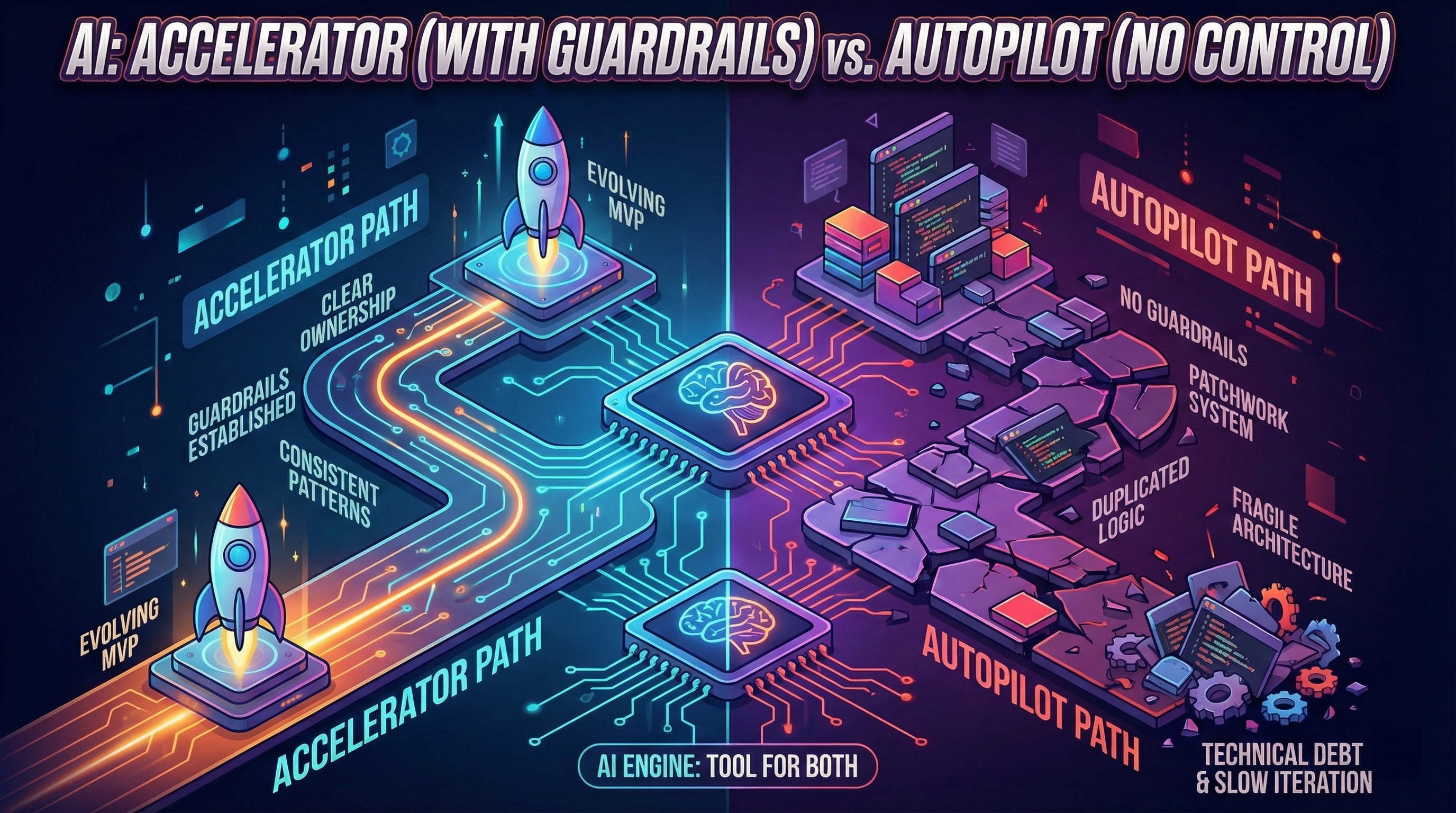
AI builders and “prompt-to-app” tools have made one thing incredibly easy: starting.
You can generate screens, flows, and even code in days. For many founders, that feels like the future.
But fast starts can hide a dangerous reality: speed without guardrails turns into technical debt—and technical debt turns into slow iteration.
This article shows a practical way to use AI the right way:
- as an accelerator (faster execution)
- not as an autopilot (outsourced thinking)
If you’re new to this topic, start here:
The Core Idea: AI Is Great at Output, Not Ownership
AI is excellent at producing:
- Drafts
- Variations
- Scaffolding
- Suggestions
But building an MVP that can evolve requires ownership:
- Clear decisions
- Consistent patterns
- Stable data models
- Safe iteration
Autopilot usage often skips ownership. That’s how patchwork systems form.
If you want to build with a team that uses AI as an accelerator while maintaining human ownership, our MVP development process follows these principles.
If you want hands-on guidance on applying this framework to your startup, talk to our consultants. We help founders navigate AI adoption without the technical debt trap.
If you’re seeing instability already:
The Accelerator Framework (Simple)
Use AI for:
- Speeding up known work
- Exploring options
Do not use AI for:
- Making core architectural decisions for you
- Patching production issues blindly
Here’s the framework as a flow:

Reversible tasks are safe. Irreversible decisions require structure.
Where AI Works Best in MVP Development
1) Discovery and product clarity
AI is great for:
- Mapping user stories
- Refining value propositions
- Drafting PRDs
- Generating interview questions
It helps you think faster—but you still decide.
If you’re still shaping your MVP scope:
2) Prototyping and UI iteration
AI shines in:
- First-pass UI copy
- Layout ideas (v0.dev, Cursor AI suggestions)
- Quick prototypes (Figma with AI plugins)
This is the “demo phase.” It’s useful—just don’t confuse it with production. Understanding why the first demo is easy but making it work for real is not helps set the right expectations.
Time savings: 2-3 days prototyping → 4-6 hours with AI (80% faster).
3) Code scaffolding (with review)
AI can generate:
- Boilerplate (auth flows, CRUD endpoints)
- API route templates
- React components (forms, tables, modals)
- Database schemas (initial draft)
But only if you:
- Use consistent conventions (ESLint, Prettier, TypeScript strict mode)
- Review the output (don’t merge blindly)
- Keep architecture explicit (document key decisions)
Time savings: 1 week manual coding → 2-3 days with AI + review (60% faster).
4) Testing and documentation drafts
AI can accelerate:
- Unit test drafts (given function signature, AI writes test cases)
- E2E test templates (Playwright/Cypress scenarios)
- Documentation first drafts (API docs, README)
Critical rule: Tests must be validated. Documentation must match reality. AI drafts ≠ production-ready.
Time savings: 1 day writing tests → 3-4 hours with AI + validation (70% faster).
Where AI Becomes Dangerous
1) Blind fixes under time pressure
When founders prompt:
> “Fix the bug.”
AI may:
- Change multiple areas (introduce side effects)
- Use inconsistent patterns (breaks conventions)
- Create new regressions (fixes symptom, not cause)
That’s how teams fall into the “fix loop.”
Example: Checkout flow bug. AI fixes payment validation, but breaks order confirmation email. You fix email, but now inventory update fails. 3 bugs from 1 fix. These are classic early signs of technical debt that compound over time.
2) Architecture by accumulation
If each feature is generated independently, you get:
- Duplicated logic (same validation in 5 places)
- Scattered business rules (pricing logic in UI components)
- Unclear data contracts (API responses change shape randomly)
The system becomes fragile.
Result: Every change breaks 2-3 other things. Velocity drops from 1 feature/week → 1 feature/month.
If you’re already here:
3) Overconfidence in AI suggestions
Danger: AI suggests “best practices” that are outdated, insecure, or incompatible with your stack.
Example: AI suggests storing passwords in plain text (because training data included old tutorials). You ship it. Security breach.
Rule: Always validate AI output against current documentation (official docs, not blog posts from 2018).
Failure case studies: when AI slows you down
Case 1: Blind prompt-to-prod workflow
Scenario: Founder uses Cursor AI to build B2B SaaS. Every feature: prompt → generate → deploy. No code review, no tests.
What went wrong (Week 4-8):
- User roles broken (admin can’t access admin panel)
- Payment webhooks fail silently (customers charged but no confirmation)
- Database migration breaks production (no staging environment)
Time cost: 4 weeks firefighting bugs vs 2 weeks if guardrails existed from Day 1.
Lesson: AI without tests + staging = faster start, slower finish.
Case 2: AI hallucinated edge cases
Scenario: Marketplace MVP uses AI to generate “supplier approval” flow. AI suggests workflow, founder ships it.
What went wrong:
- AI didn’t handle “supplier already approved” case (duplicate approvals)
- AI didn’t handle “supplier deleted mid-approval” case (orphaned records)
- AI didn’t handle “admin rejects then re-approves” case (state inconsistency)
User impact: 3 suppliers lost, 2 left angry reviews. Founder spent 10 days fixing edge cases AI missed.
Lesson: AI optimizes for happy path. You must test edge cases manually.
Case 3: Over-reliance on AI refactoring
Scenario: SaaS founder asks AI: “Refactor this codebase for performance.”
What went wrong:
- AI changed data models (broke existing API contracts)
- AI removed “unused” functions (they were used, AI just didn’t detect it)
- AI introduced new dependencies (increased bundle size by 40%)
Recovery cost: 2 weeks rolling back changes + manually refactoring.
Lesson: AI doesn’t understand your entire system. Large refactors = human-led with AI assistance, not AI-led.
Hybrid workflow: human + AI (70/30 split)
Week 1-2: Architecture (100% human)
Human decisions:
- Data model design (tables, relationships, constraints)
- API contract definition (endpoints, request/response shapes)
- Authentication strategy (JWT, sessions, OAuth)
- Deployment architecture (serverless, containers, monolith)
AI role: Zero. These are irreversible decisions. AI should not lead.
Week 3-4: Implementation (30% human, 70% AI)
Human work:
- Review AI-generated code (20% of time)
- Write complex business logic (20% of time)
- Define test scenarios (10% of time)
AI work:
- Generate boilerplate (forms, CRUD, auth scaffolding)
- Draft tests based on scenarios
- Generate API documentation
Time savings: 4 weeks traditional → 2-3 weeks hybrid.
Week 5-6: Hardening (50% human, 50% AI)
Human work:
- Add error handling (AI misses edge cases)
- Setup monitoring + alerting (manual decisions on what to track)
- Performance optimization (based on real usage data, not guesses)
AI work:
- Generate monitoring dashboards (Grafana, Datadog configs)
- Draft error messages (human reviews for tone)
- Generate load test scenarios (k6, Locust scripts)
Week 7+: Iteration (40% human, 60% AI)
Human work:
- Prioritize features based on user feedback
- Design complex UX flows
- Debug production issues (root cause analysis)
AI work:
- Implement approved features (scaffolding + components)
- Generate test variations (A/B test implementations)
- Draft customer support responses (human edits before sending)
When AI accelerates vs when AI slows
AI Accelerates (Use Liberally)
| Task | Time Saved | Risk | Verdict |
|---|---|---|---|
| Boilerplate code (forms, CRUD) | 60-80% | Low | ✅ Use AI |
| UI component drafts (buttons, modals) | 70% | Low | ✅ Use AI |
| Test scaffolding (given scenarios) | 70% | Medium (validate) | ✅ Use AI + review |
| Documentation drafts | 60% | Low | ✅ Use AI |
| Prototyping (throwaway demos) | 80% | Zero (disposable) | ✅ Use AI |
AI Slows (Use Cautiously)
| Task | Time Saved | Risk | Verdict |
|---|---|---|---|
| Architecture decisions | -50% (wrong decisions = rework) | Very High | ❌ Human-led |
| Production bug fixes (blind prompts) | -30% (creates regressions) | High | ❌ Human debug first |
| Large refactors | -40% (breaks contracts) | Very High | ❌ Human-led |
| Security implementations (auth, encryption) | -20% (outdated patterns) | Critical | ❌ Human + security review |
| Complex business logic | -10% (edge cases missed) | High | ❌ Human writes, AI assists |
Rule: If failure cost > time saved, don’t use AI autopilot.
The Guardrails That Keep You Fast
If you want AI speed and product-level control, you need a few guardrails.
Guardrail A — A clear data model early
Weak data models are one of the fastest paths to technical debt.
Action: Spend 1-2 days designing schema before any AI code generation. AI can suggest, but human decides.
Guardrail B — Centralized business rules
Rules should not live in random UI components.
Action: Create a rules/ or business-logic/ folder. AI can generate implementations, but rules live in one place.
Guardrail C — Testing core flows
Without tests, teams slow down out of fear.
Action: AI generates test scaffolding, human writes critical scenarios (payment, auth, data mutations).
Guardrail D — Staging + rollback
Shipping without a safety net makes every change risky.
Action: Deploy to staging first. AI can’t predict production edge cases.
A practical checklist is here:
External reference on why small changes become hard in complex systems: https://en.wikipedia.org/wiki/Software_entropy
DIY vs Partner: Using AI Without Losing Momentum
DIY can work if you can enforce these guardrails yourself.
Partner-led development is often safer when:
- Time-to-market matters (can’t afford 2-4 weeks of trial/error)
- Predictability matters (fixed cost, fixed timeline)
- You don’t want to be the QA department (every bug = your time)
If you’re undecided:
How We Use AI at The Byte-sized
We use AI every day.
But we use it inside a method:
- Clear ownership of decisions (human architect leads, AI implements)
- Consistent patterns (ESLint + Prettier + TypeScript strict)
- Hardening of core flows (tests + staging + monitoring)
- Weekly demos and visible progress (not black box development)
That’s what turns AI into an accelerator.
If you care about visibility and trust:
Conclusion: AI Is the Engine. Guardrails Are the Steering Wheel.
AI can make you faster.
But speed without steering leads to debt—and debt leads to slow iteration.
Remember:
- Accelerator framework: Reversible decisions = AI fast, irreversible decisions = human-led
- Hybrid workflow: Week 1-2 architecture 100% human, Week 3-4 implementation 70% AI, Week 5+ iteration 60% AI
- AI accelerates: Boilerplate, UI drafts, tests scaffolding (60-80% time saved)
- AI slows: Architecture, blind bug fixes, large refactors (-30% to -50% time wasted)
- Failure cases: Blind prompt-to-prod = 4 weeks firefighting, hallucinated edge cases = 10 days fixing, over-reliance refactoring = 2 weeks rollback
Use AI as an accelerator. Keep ownership. Build something that stays fast after launch.